
简单使用
This content is not available in your language yet.
SRA-server 是 SRA 的 Web API 服务端,在 SRA 运行时提供一个 HTTP 服务器,允许其他程序通过 HTTP 请求来控制 SRA 运行。
基于 ASP.NET Core 构建,内置 Swagger UI 文档和 MCP(Model Context Protocol)支持。
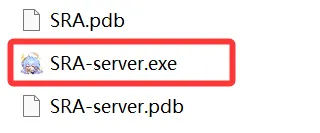
运行 SRA-server.exe 即可启动 HTTP 服务器。
SRA-server.exe服务器默认监听端口为 5000,启动后可通过浏览器访问 http://localhost:5000 查看 Web UI。
使用 --urls 参数指定监听地址和端口:
SRA-server.exe --urls http://0.0.0.0:8080这将启动一个监听端口为 8080 的 SRA HTTP 服务器。您可以同时指定多个地址:
SRA-server.exe --urls "http://0.0.0.0:5000;http://0.0.0.0:8080"其他启动参数
Section titled “其他启动参数”| 参数 | 说明 |
|---|---|
--urls <地址> |
指定监听地址和端口 |
--no-webui |
跳过 Web UI 静态文件服务,仅提供 API |
--use-python |
强制使用 Python 后端而非 CLI 后端 |
示例:仅启动 API 服务,不加载前端 UI:
SRA-server.exe --no-webui --urls http://0.0.0.0:8080启动服务端后,您可以通过 curl 快速验证服务是否正常工作:
获取任务状态
Section titled “获取任务状态”curl http://localhost:5000/api/Task/statuscurl -X POST http://localhost:5000/api/Task/run \ -H "Content-Type: application/json" \ -d '{"configName": "Default"}'curl -X POST http://localhost:5000/api/Task/stop查看后端日志
Section titled “查看后端日志”curl http://localhost:5000/api/Backend/logs?count=50SRA-server 本身是一个中间层,它管理一个后端进程(SRA-cli 或 Python)并通过 stdin/stdout 与之通信。工作流程如下:
- SRA-server 启动并监听 HTTP 请求
- 后端进程在首次请求或手动启动时按需启动
- HTTP 请求被转换为 CLI 命令发送给后端进程
- 后端进程的输出通过 API 或 SSE 日志流返回给客户端
┌─────────────────┐ HTTP ┌──────────────────┐│ 外部程序 / 客户端 │ ──────────────> │ SRA-server ││ (curl, 浏览器等) │ <────────────── │ (ASP.NET Core) │└─────────────────┘ └────────┬─────────┘ │ stdin/stdout ┌───────▼─────────┐ │ SRA-cli.exe │ │ (后端进程) │ └─────────────────┘默认情况下 SRA-server 不需要认证。如需保护 API 访问,可以在 appsettings.json 中设置 AccessToken:
{ "AccessToken": "your-secret-token-here"}设置后,所有 API 请求都需要携带 Token。详见 认证 文档。
生产环境中强烈建议启用认证,特别是当 SRA-server 暴露在公网时。